 oasis-b
LW_TextTools
Bold keywords, a "found item" card, level up cards, a banner for new skills and clean text splitting into windows.
Needs LW_Core (LWZ_Core in MZ) above all Living World plugins in the Plugin Manager. It's included in every pack.
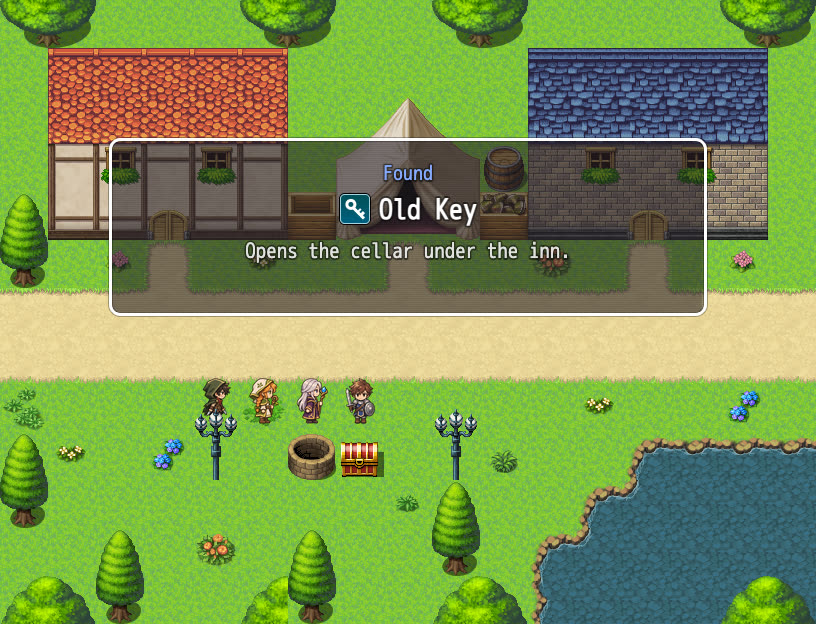
Text that reads well and moments that feel like a reward.
Highlights
- Bold keywords with one text code
- A "found item" card with icon, name and description
- Level up cards and a banner for new skills
- Clean splitting of long text into windows
Ideas for your game
- A key item that really stands out when the party finds it
- Names of places in bold in a quest giver's text
Works well with
Introduction
Requires LW_Core.
Emphasis
\W[Old Key]
Shows the words in bold (and in the Emphasis Color, if set). Browsers fake bold for fonts that have no bold weight. For a clean look add the bold file of your font to fonts/gamefont.css.
Found Card
Every "Change Items / Weapons / Armors" with Increase shows a card on the map with icon, name and description. The event waits until the player presses Cross. The title is "Found" when the event name starts with "Found:" or when a comment "LW Found" stands right before the command, otherwise "Received".
No card for:
- items with <LW No Card> in their note
- a comment "LW No Card" right before the command
- while the Found Card Off Switch is ON
After a battle, loot the party never had before shows on the same card as "New loot".
Level Up
In battle, each actor who levels up gets a card on the right: face, old and new level, every stat with its gain and the new skills. On the map the same goes into the message window. The music plays once per battle.
Skill Banner
LW_Banner type skillId [actorIds]
type is skill, combo or special. Shows a banner in the middle of the screen with icon, name, description and the faces of the actors. Each skill gets the banner only once.
LW_Banner combo 45 1,3
When an event teaches a skill of the Combo Skill Type with "Change Skill", the banner comes by itself. The actors come from the skill's note: <LW Combo: 1,3>
Speakers Who Aren't There
Actor note: <LW Only Speaks When Present>
A message with that actor's name (in a name box \n<Name> or as first line \C[6]Name:\C[0]) or with that actor's face is skipped when the actor is neither in the party nor visible as a character on the map. Set $gameTemp._lwEveryoneTalks = true for flashbacks and credits.
Splitting Long Text
LW.textPages(text, lineLength, maxLines)
Splits a long text into message windows. A window ends at the end of a sentence where possible, never leaves a tiny scrap in the last window and never a single word alone in the last line. Returns an array of windows, each an array of lines. Handy for NPC dialogue that comes from a file.
Terms of Use
See TERMS_OF_USE.txt in the download. Short version: use it in as many of your own games as you like, free or commercial. Edit it for your game, but keep this header. Don't share or resell the plugin files on their own. Name oasis-b in the credits of your game.
Changelog
Version 1.0.0 - 2026-11-21 - First release.
Plugin commands in MZ
In MZ these come as Plugin Command in the event editor, with fields to fill in. Old MV text commands from copied events keep working.
Show Skill Banner
Banner in the middle of the screen with icon, name, description and faces. Once per skill.
- Type (select) Default: skill.
- Skill (skill) Default: 1.
- Actors (actor[]): Faces on the banner. Empty = from the note <LW Combo: 1,3> of the skill. Default: [].
Introduction
Requires LWZ_Core.
Emphasis
\W[Old Key]
Shows the words in bold (and in the Emphasis Color, if set). Browsers fake bold for fonts that have no bold weight. For a clean look add the bold file of your font to fonts/gamefont.css.
Found Card
Every "Change Items / Weapons / Armors" with Increase shows a card on the map with icon, name and description. The event waits until the player presses Cross. The title is "Found" when the event name starts with "Found:" or when a comment "LW Found" stands right before the command, otherwise "Received".
No card for:
- items with <LW No Card> in their note
- a comment "LW No Card" right before the command
- while the Found Card Off Switch is ON
After a battle, loot the party never had before shows on the same card as "New loot".
Level Up
In battle, each actor who levels up gets a card on the right: face, old and new level, every stat with its gain and the new skills. On the map the same goes into the message window. The music plays once per battle.
Skill Banner
Plugin command Show Skill Banner: type (skill, combo or special), skill and actors. Shows a banner in the middle of the screen with icon, name, description and the faces of the actors. Each skill gets the banner only once. Events copied from MV keep working: LW_Banner combo 45 1,3
When an event teaches a skill of the Combo Skill Type with "Change Skill", the banner comes by itself. The actors come from the skill's note: <LW Combo: 1,3>
Speakers Who Aren't There
Actor note: <LW Only Speaks When Present>
A message with that actor's name (as the speaker name of Show Text, in a name box \n<Name> or as first line \C[6]Name:\C[0]) or with that actor's face is skipped when the actor is neither in the party nor visible as a character on the map. Set $gameTemp._lwEveryoneTalks = true for flashbacks and credits.
Splitting Long Text
LW.textPages(text, lineLength, maxLines)
Splits a long text into message windows. A window ends at the end of a sentence where possible, never leaves a tiny scrap in the last window and never a single word alone in the last line. Returns an array of windows, each an array of lines. Handy for NPC dialogue that comes from a file.
Terms of Use
See TERMS_OF_USE.txt in the download. Short version: use it in as many of your own games as you like, free or commercial. Edit it for your game, but keep this header. Don't share or resell the plugin files on their own. Name oasis-b in the credits of your game.
Changelog
Version 1.0.0 - First release for MZ.
Get it
LW_TextTools is in these packs. Every pack comes as an MV and an MZ download at the same price and needs no other plugin collection. Tested in RPG Maker MV 1.6.2 and MZ 1.10.0 games on Windows, macOS and Linux and in current browsers.