 oasis-b
Docs / Controls and quality of life
LW_SaveGuard
Old save files survive your game updates. Saving can't corrupt the running game. Optional "game cleared" save.
Needs LW_Core (LWZ_Core in MZ) above all Living World plugins in the Plugin Manager. It's included in every pack.
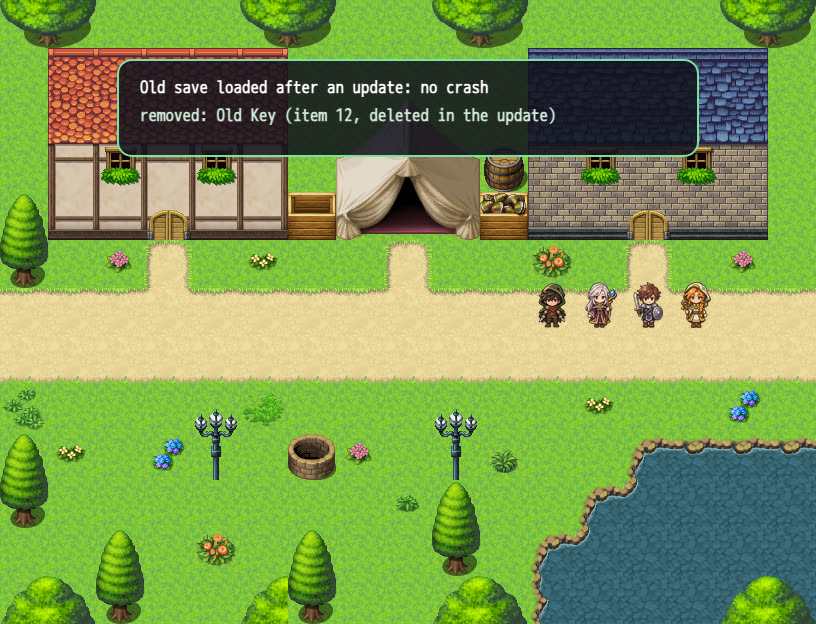
Old saves survive your updates.
Highlights
- Cleans every save while it loads: deleted items, skills, actors and maps are removed
- The map is always reloaded from your data, not from the old save
- Saving can no longer break the running game
- An optional "game cleared" save after the ending
Ideas for your game
- Shipping version 1.1 without breaking players' saves
- Removing a test item after release
Works well with
Introduction
You ship an update, you deleted an item or a map, and a player's old save crashes. This plugin cleans every save while it loads:
1. The map is always reloaded from data. MV only does that when the
  versionId in System.json changed, and only the editor changes it.
 2. Items, weapons and armor without a database entry leave the bag.
 3. Skills, states, equipment and classes without an entry are removed
  from every actor. Actors without an entry leave the party.
 4. If the map is gone, the party moves to the wake point from
  LW_BattleRules, or to the start position.
 5. Battle leftovers are cleared. Some plugins store the last attacker or
  a taunting enemy on the actor, and that would end up in the save.
Everything that was removed is listed in the console and in $gameSystem._lwSaveGuard.removed.
Saving is protected too. MV marks the live game objects while it encodes a save and cleans them up at the end. When encoding fails halfway, the marks stay, and the next save writes broken data to disk. Here the cleanup always runs, and objects without a constructor are saved as plain objects instead of throwing.
Migrations
For bigger changes write a migration in a small plugin below this one. Each runs once for every save that is older than its version:
LW.saveGuard.migrations.push({
    version: 2,
    name: 'Potion became item 12',
    run: function() {
        var n = $gameParty._items[7] || 0;
        delete $gameParty._items[7];
        $gameParty._items[12] = ($gameParty._items[12] || 0) + n;
    }
});
LW.saveGuard.version = 2;
Game Cleared
LW_SaveGuard cleared
Marks the game as cleared for all save files (stored in config.rpgsave) and writes a save into the Cleared Save Slot. The save menu won't overwrite that slot. With "Title After Clear" the title screen changes.
Use the Clean Save Switch around your ending: turn it ON before the final scenes and a save made there loads into a clean map instead of the middle of a running cutscene.
LW.saveGuard.isCleared() true after "LW_SaveGuard cleared"
Also Fixed
MV ignores the promise returned by video.play(). Reloading the page while a movie starts throws an error. This plugin catches it.
Terms of Use
See TERMS_OF_USE.txt in the download. Short version: use it in as many of your own games as you like, free or commercial. Edit it for your game, but keep this header. Don't share or resell the plugin files on their own. Name oasis-b in the credits of your game.
Changelog
Version 1.0.0 - 2026-11-21 - First release.
Plugin commands in MZ
In MZ these come as Plugin Command in the event editor, with fields to fill in. Old MV text commands from copied events keep working.
Game Cleared
Marks the game as cleared for every save file and writes the Cleared Save Slot.
Introduction
You ship an update, you deleted an item or a map, and a player's old save crashes. This plugin cleans every save while it loads:
1. The map is always reloaded from data. MZ only does that when the
  versionId in System.json changed, and only the editor changes it.
 2. Items, weapons and armor without a database entry leave the bag.
 3. Skills, states, equipment and classes without an entry are removed
  from every actor. Actors without an entry leave the party.
 4. If the map is gone, the party moves to the wake point from
  LWZ_BattleRules, or to the start position.
 5. Battle leftovers are cleared. Some plugins store the last attacker or
  a taunting enemy on the actor, and that would end up in the save.
Everything that was removed is listed in the console and in $gameSystem._lwSaveGuard.removed.
Saving is protected too. MZ writes the class name of every object into the save and stops with an error when an object has no constructor, so one broken plugin object can make every save fail. Here such objects are saved as plain objects, and the console names their keys.
Migrations
For bigger changes write a migration in a small plugin below this one. Each runs once for every save that is older than its version:
LW.saveGuard.migrations.push({
    version: 2,
    name: 'Potion became item 12',
    run: function() {
        var n = $gameParty._items[7] || 0;
        delete $gameParty._items[7];
        $gameParty._items[12] = ($gameParty._items[12] || 0) + n;
    }
});
LW.saveGuard.version = 2;
Game Cleared
Plugin command: LWZ_SaveGuard > Game Cleared
Marks the game as cleared for all save files (stored in the config file) and writes a save into the Cleared Save Slot. The save menu won't overwrite that slot. With "Title After Clear" the title screen changes.
Use the Clean Save Switch around your ending: turn it ON before the final scenes and a save made there loads into a clean map instead of the middle of a running cutscene.
LW.saveGuard.isCleared() true after "Game Cleared"
Also Fixed
Movies are started with video.play(), which returns a promise. When the page reloads while a movie starts, that promise fails with an error in the console. This plugin catches it.
Terms of Use
See TERMS_OF_USE.txt in the download. Short version: use it in as many of your own games as you like, free or commercial. Edit it for your game, but keep this header. Don't share or resell the plugin files on their own. Name oasis-b in the credits of your game.
Changelog
Version 1.0.0 - First release for MZ.
Get it
LW_SaveGuard is in these packs. Every pack comes as an MV and an MZ download at the same price and needs no other plugin collection. Tested in RPG Maker MV 1.6.2 and MZ 1.10.0 games on Windows, macOS and Linux and in current browsers.